CDAS contains a REST API that can be found on port 12555, on the /dm/ path. The API is hosted on HomeGate and is accessible locally and from the CloudSpace.
Troubleshooting
CDAS has a webpage that allows testing of the Document Management API. This page is hosted at http://localhost:12557/dm.html and covers all the endpoints that make up the Document Management API.
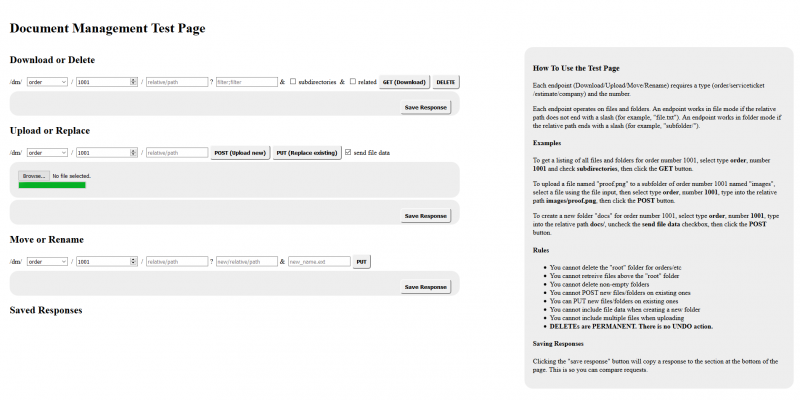
Test Page Instructions
The instructions are reproduced here to allow text search:
How To Use the Test Page
Each endpoint (Download/Upload/Move/Rename) requires a type (order/serviceticket/estimate/company) and the number.
Each endpoint operates on files and folders. An endpoint works in file mode if the relative path does not end with a slash (for example, “file.txt”). An endpoint works in folder mode if the relative path ends with a slash (for example, “subfolder/”).
Examples
To get a listing of all files and folders for order number 1001, select type order, number 1001 and check subdirectories, then click the GETbutton.
To upload a file named “proof.png” to a subfolder of order number 1001 named “images”, select a file using the file input, then select typeorder, number 1001, type into the relative path images/proof.png, then click the POST button.
To create a new folder “docs” for order number 1001, select type order, number 1001, type into the relative path docs/, uncheck the send file data checkbox, then click the POST button.
Rules
- You cannot delete the “root” folder for orders/etc
- You cannot retreive files above the “root” folder
- You cannot delete non-empty folders
- You cannot POST new files/folders on existing ones
- You can PUT new files/folders on existing ones
- You cannot include file data when creating a new folder
- You cannot include multiple files when uploading
- DELETEs are PERMANENT. There is no UNDO action.
Saving Responses
Clicking the “save response” button will copy a response to the section at the bottom of the page. This is so you can compare requests.
CDAS and Document Management Root Path
In order for the Document Management API to function, the Document Management Root Path must be accessible by the machine running the CDAS. It is not accessible, no files or folders will be available.