Table of Contents
Regenerate an export for a closeout period.
Concept
This page will walk you step by step through regenerating a GL Export for the accounting software your business uses to handle accounting. I will refer to QuickBooks and iif files as these are most common, but the steps are the same regardless of the third party software.
Cautions
Quickbooks will allow you to import the same file multiple times without record or warning. Be sure to delete any incorrect GL entries when reimporting.
Control Defaults the file name to the date and time the file was created. It is a good idea to rename your export to the date time of the data contained in it. (simply select the file and press F2 to edit the file name.)
Steps
- Step 1 - Select your Report
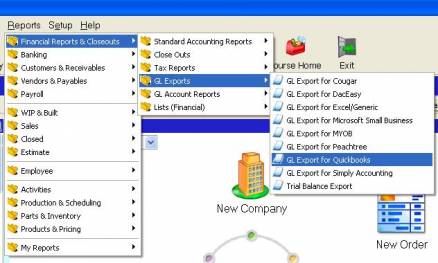
- Step 2 - Select the Closeout Period
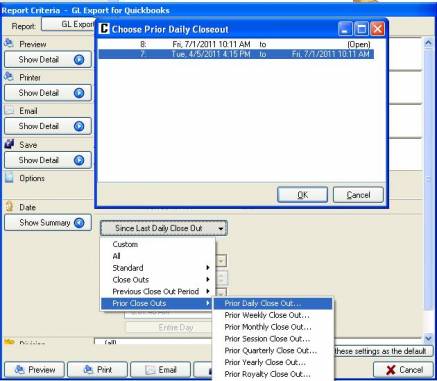
- Step 3 - Note the path your file will save to -

- Step 4 - at this point you may either preview or save the export file. Previewing is a good idea to ensure the file at least looks correct (ie that it contains data). After Saving, go to the path specifie
Source
Contributor: who, company (optional)
Date: _ _/_ _/2009
Version: Control 4._