Table of Contents
Office 365 Email is now fixed for Control 5.1 and above.
Concept
Basic guide for configuring the ability to email from Control using Office 365 settings. These setting are for Control 5.1 and above. Not yet tested in 4.6 or lower version of Control.
Screen
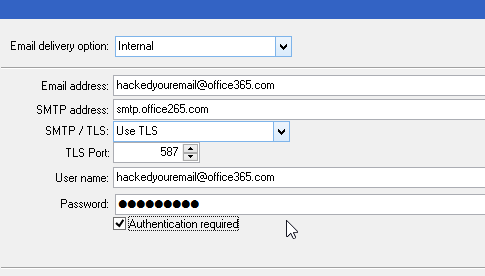
To set the global setting:
- Open Control
- Click on Setup > System Setup.
- Click on Email Options.
- Click on the Edit button on the right side toolbar.
- Click on the drop down list for Email delivery option: and select Internal.
- Fill in the your Email Address.
- Enter smtp.office365.com in the SMTP Address.
- Select the Use TLS item in the SMTP / TLS drop down.
- Enter 587 for the TLS Port.
- Fill in the Username for your Office 365 account.
- Fill in the Password for your Office 365 account.
- Check the Authentication required checkbox.
- Click on the Save button on the right side toolbar
- Click the Send Test Email button.
- If you get an Email Sent pop-up, click OK. You are now done configuring your email, if not, verify the Username and Password are correct.
To set the user setting:
- Open Control
- Click on Setup > User Options.
- Click on Email Options.
- Click on the Edit button on the right side toolbar.
- Click on the drop down list for Email delivery option: and select Internal.
- Fill in the your Email Address.
- Enter smtp.office365.com in the SMTP Address.
- Select the Use TLS item in the SMTP / TLS drop down.
- Enter 587 for the SMTP Port.
- Fill in the Username for your Office 365 account.
- Fill in the Password for your Office 365 account.
- Check the Authentication required checkbox.
- Click on the Save button on the right side toolbar
- Click the Send Test Email button.
- If you get an Email Sent pop-up, click OK. You are now done configuring your email, if not, verify the Username and Password are correct
Troubleshooting
- For smtp socket errors, make sure your email username and password is typed correctly and are current.
- Should you need help with your office 365 email password, you can follow these links Reset Users Password for Office 365
Source
Wiki created by David Kingsbury
Date: 04/02/2015
Version Tested was Control 5.5 but should work in 5.1 as well.