Table of Contents
To begin tracking a part in inventory
- Setup>Pricing Setup>All Pricing Setup
- Part Setup> Expand and select the part you wish to track
- Edit and check the 'Track Inventory' box located in the Accounting tab. (may need to uncheck 'Use Category Defaults')
- Notice additional tabs (inventory) are now available.
- On Hand levels may be set here by entering existing levels as Billed or Received
To enter or adjust inventory levels
- Setup>Pricing Setup>Adjust Part Inventory and Cost
- Expand down to the part you wish to affect
- Set the desired levels using the sub-explorer window
To recieve parts into inventory
- Vendors>New>accounting_ch_07-purchase_orders
- Add parts you intend to, or have ordered and save the document as a Purchase Order.
- At this point there will be one of two paths available to Inventory and Recieving Managers.
- Create a accounting_ch_08-receiving_documents - items may be received by line or purchase order.
- Convert directly to a accounting_ch_09-bills_from_vendors.
Receiving Documents are a useful tool for tracking internal movement of inventory and identifying sources of operational loss.
To understand basic inventory formula used by control
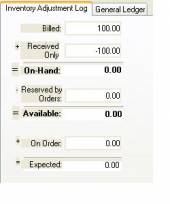
Billed + Received Only = On Hand - Reserved = Available + On Order = Expected.
As noted below this is the formula that should be used when making determinations of accuracy in a physical count.
Note that while the entire formula is often visible. Control will often only fill in those portions relevant to a given line item. As in the case shown here, this illustration was taken from an activity line it does not reflect all fields, but is showing the effect of this line on the formula. Here a receiving document has been converted to a bill. The overall effect on the On Hand amount is '0.' The items are simply moving from received into billed. The physical number of items has not changed, and is not reflected in the selection of the activity line level formula viewer. In this case there are a total of 300 units available in the warehouse.
Warehouse specific parts
If you are setup to use warehouses in Control, then you have the ability to limit which parts are stocked in specific warehouses.
Please note:
- Order parts can not be assigned to a warehouse that does not stock that part.
- Purchase Orders, Bills, and Receiving Documents can not include parts that are not stocked in the warehouse assigned to it.
- Inventory transfers of parts can not be made to or from a warehouse that does not stock that part.
Activating the warehouse specific parts feature
- Setup>Accounting Setup>General
- In the Inventory section, check “Allow warehouse specific parts.”
- Note: “Enable Division Tracking” and “Enable Warehouses” must be checked before you are able to activate warehouse specific parts.
Selecting parts for a warehouse
- Setup>Pricing Setup>All Pricing Setup
- Warehouse Setup> Select a warehouse
- By checking or unchecking the check box on the left side of the tree, you can select which parts are stocked in the given warehouse.
- Note: The inventory quantities must to all zero before you can remove a part from a warehouse.
Selecting warehouses for a part
- Setup>Pricing Setup>All Pricing Setup
- Part Setup> Select a part that tracks inventory
- Select the inventory tab
- By checking or unchecking the check box on the left side of the tree, you can select which warehouses stock a given part.
- Note: The inventory quantities must to all zero before you can remove a part from a warehouse.