Table of Contents
{$page}
As with most explorers in Control, the Artwork Group Explorer is also available as a dashboard instrument. They can be used as regular explorer instruments or as sub-explorers.
Artwork Group Explorer Instrument
To access the Artwork Group Explorer Instrument, click the Add Instrument option on any dashboard. Then, select Explore > Artwork Group Explorer.

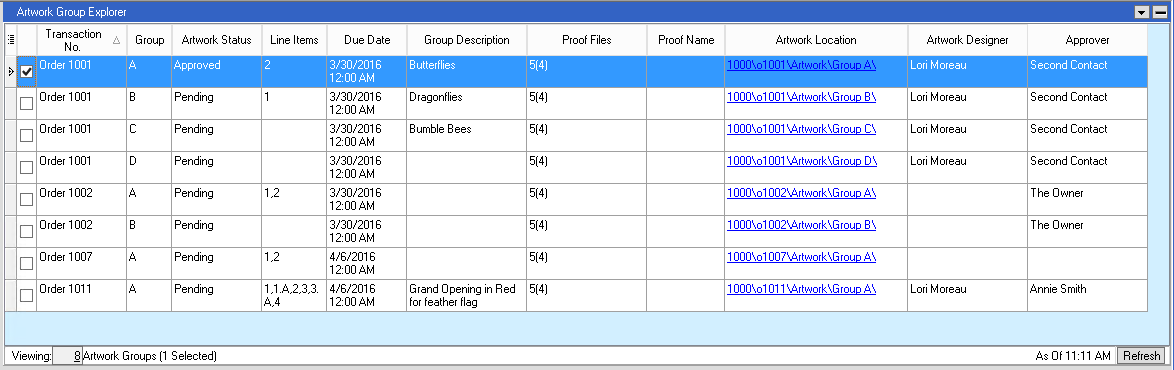
This is a view of what the Artwork Group Explorer instrument looks like. The typical behaviors that you'd expect with any explorer instrument is available. Some of the more applicable columns were added in the screenshot below.
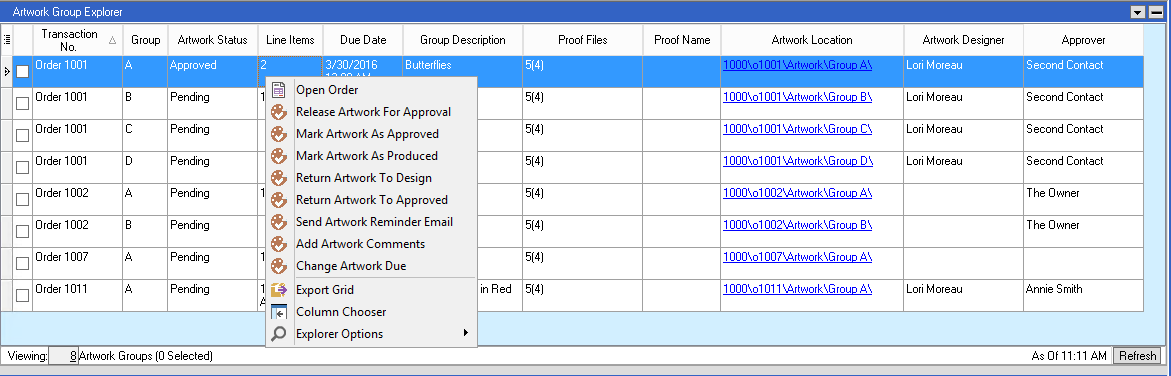
Here's a view of the right-click options that are available from the Artwork Group Explorer instrument:
Source
Contributor: Cyrious Software
Date: 03/31/2016
Version: Control 05.7
See Also
- Backlinks include_pagepage_componentbacklinks