Table of Contents
Order Board
Explanation
This page will explain the Order Board's purpose, setup, and will enable you to use it yourself.
1. Purpose
The purpose of the Order Board was to be used as a compressed model file for clients to have a place where they can keep their placed orders. It was made to use simple code that any developer can take and tweak to the client's liking. It is not limited to orders however. It can be used as a Grid View for any data, and is especially set up to connect to a SQL database
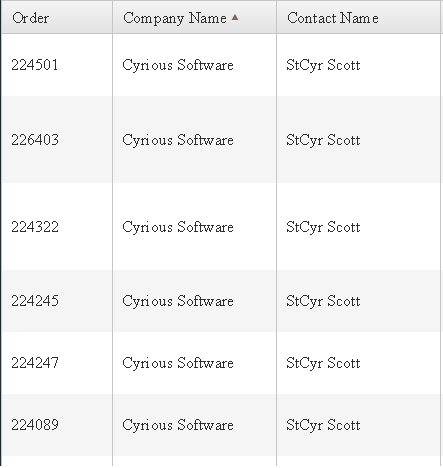
Here, the head names are Order, Company Name, and Contact Name. These heading are all directly related to columns in your database. The code receives the columns from the database, turns them into the names that you choose, and puts them onto the grid.
- Order: Shows all data in the “OrderNumber” column of the database.
- Company Name: Shows all data in the “CompanyName” column of the database.
- Contact Name: Shows all data in the “Contact” column of the database
There are also a number of things you can do from here, including:
- Sorting
- You can sort any heading by clicking the name of the heading; click it once to ascend, and twice to descend.
- Paging
- There are a variety of ways you can page, like clicking the arrow button for which way that you want to page, clicking the button of the page, and entering which page you want to go to.
2. Setup
What is actually happening:
- When the page loads, the data from the database is called, then is put into grid form.
- When sort is clicked, the browser makes a request to the server for the data. There, the data is sorted alphabetically, then sent back to the client. If it is clicked again, another request is made; however, this time the data is sorted ascending alphabetically.
- When a page is clicked, the server sends the data to the browser, then the browser runs a function using the page number to designate exactly how many items need to be skipped and how many need to be taken, and then formats that particular group of entries.
What you need to do to get this working
- Attached is the file with all of the code for the Order Board. However, to get it working for you, you're gonna need to do a couple things including:
### Download the file.
### Right click the file and click “extract all”.
### Enter the file, and click CyriousInternalDatasource.sln. That will load the website in Visual Studios 2012.
### Attach your database to the project by going into the Web.config and find the line that contains connectionString=““. Enter your database information in between the parentheses.
### Go into ValuesController.cs. Within the switch case, you'll find the cases with names like “OrderStation”,”CompanyName”, “Contact”, etc. Replace these with your data categories from your database.
### Then you'll have a fully functioning grid with your data!
3. Technology
- This is grid is generated by Kendo U.I. Kendo is a HTML library that is very useful when building grids. For more information about Kendo, go to http://www.telerik.com/kendo-ui
- Angular J.S. is the framework used for the Javascript. Angular is an open-source framework that is very easy to use and great for development and testing. For more information on Angular, go to https://angularjs.org/
- Visual Studios 2012 is the development environment that is used for this project. It is used to develop computer programs for Microsoft Windows, as well as web sites, web applications and web services. For more information about Visual Studios, go to http://en.wikipedia.org/wiki/Microsoft_Visual_Studio