{$page}
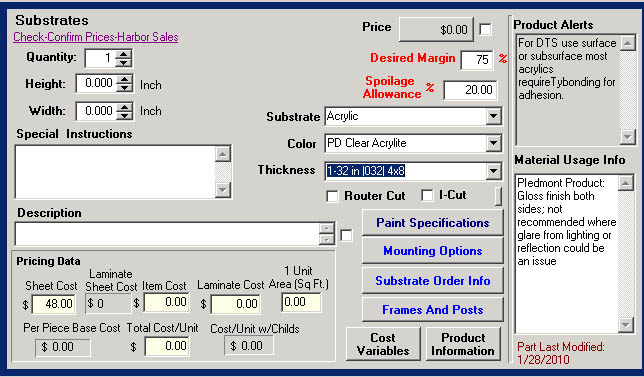
Very often you will want to warn users during the ordering process if the cost of a certain part is old. This how-to guide provides a method for doing this. Using the Formula Property of the Designer Label on the pricing form, we show the user the last time a part was ordered. Additionally, we tie this code to an error message warning the users that the price should be verified if the part has not been updated in a specified period – for example, 90 days. See the sample pricing form below to see how this is presented.
Concept
Unfortunately, Control does not track the date the cost was adjusted directly. I wanted to use the modified date of the part, but there is no way to currently access that (it is coming out in Control 4.4 I am told).
As an alternative, I used a date UDF on the part. The date UDF is automatically set every time the part is edited using a SQL Trigger (outside of Control). After a bit of working, I realized I had to use a trigger on both the Part and PartUserField table. When you edit a part, it might not trigger a save to the UDF table if no UDFs change. The reverse is also true. Therefore, both (or either) should trigger the update.
Cautions
I had to get Cyrious to help me create the SQL trigger, but the rest was straight forward. Also, since the change in the Date UDF occurs outside of Control, the computer where the change occurs does not know to re-read the data from SQL and doesn't see the change until they close. All other stations see the change immediately.
This method is only vaid for Control versions 04.40.1004.2901 and earlier. The PartUserField table is not available on later versions because Part UDFs are stored in UDFXML field of the Part table. See How To Assure Part Cost is Current For Versions 4.5 and higher.
Steps
- Create a Date UDF for Parts (I called my UDF “LastChange”).
- You must close and reopen Control to create the UDF.
- Run the following trigger SQL from within SQL Server (or the SSLIP). If you are not very familiar with SQL, I recommend you ask Cyrious Technical Support to do this for you.
CREATE TRIGGER [dbo].[UpdatePartUDFLastModifiedA] on [dbo].[Part] for Insert, Update
AS
BEGIN
SET NOCOUNT ON;
UPDATE PartUserField
SET LastChange = GetDate()
FROM Inserted
WHERE PartUserField.ID = Inserted.ID
END
;
CREATE TRIGGER [dbo].[UpdatePartUDFLastModifiedB] on [dbo].[PartUserField] for Insert, Update
AS
BEGIN
SET NOCOUNT ON;
UPDATE PartUserField
SET LastChange = GetDate()
FROM Inserted
WHERE PartUserField.ID = Inserted.ID
END
- Add CFL to the product warning to check that the part you are looking at has been updated. In my case, I am using the part linked in from the SSubtrateThickness variable.
Declare LastGoodDate := Today - 60;
IF ISASSIGNED(PartByVariableName(SsubstrateThickness)) Then
IF (PartUDFByVariableName( "SsubstrateThickness", "LastChange" ,NODATE)) < LastGoodDate THEN
""
ELSE
"The Part " + PartByVariableName("SsubstrateThickness").PartCode
+ " has not been updated since "
+ DISPLAYDATE(PartUDFByVariableName("SsubstrateThickness","LastChange",NODATE))
+ " It is recommended that you check the price."
ENDIF;
ELSE “” ENDIF
Source
Contributor: Steve Gillispie, Acorn Sign
Date: 4/30/2010
Version: Control 4.3
See Also
- Backlinks include_pagepage_componentbacklinks