Table of Contents
Overview
The mapping capabilities provide great flexibility in transforming various orders into Cyrious Control orders. Cyrious Online orders are a good example that can be used with this. This feature is to add some flexibility for simple transforms inside of Cyrious Control.
The proposed idea is to define a simple variable mapping within Control.
Screen
An optional Import Map tab for products can now be displayed. (It is not displayed by default but is available on the Advanced Tab to turn on.)
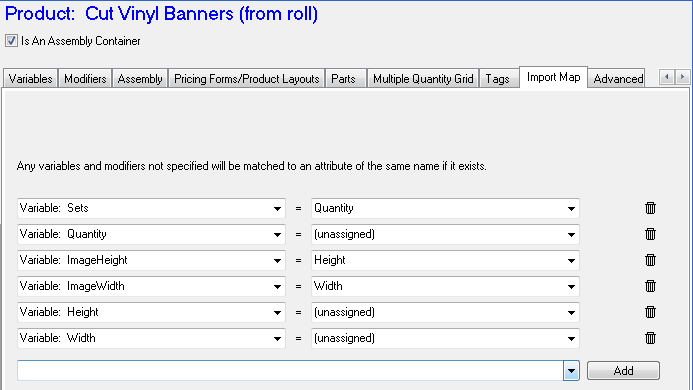
The Variable Import Map box is a memo box that contains a list of variables and modifiers that can be used for custom mapping.
No variable validation or other syntax checking is performed on the Variable Mapping box.
Variable Mapping Syntax
The variable mapping syntax is simple. We will use Cyrious Online for the examples below.
Two possible statement types are allowed:
Variable Assignment Statement → varname := importvar(“{OnlineAttribute}”);
Variable Non Assignment Statement → varname := Unassigned ;
Modifier Assignment Statement → modifier(“{varname}”) := importvar(“{OnlineAttribute}”);
Modifier Non Assignment Statement → modifier(“{varname}”) := Unassigned ;
- The Assignment Statement is used to specify that a particular Control Variable should be set to the specified Online Attribute.
- The Non-Assignment Statement is used to specify that a particular Control Variable should not be overridden even if an Online Attribute of the same name exists.
Notes: No validity checking is performed on the variable mapping.
Change in COETL import field
COETL no longer inserts entries into the ParamStr XML field as it currently does. Instead, all COETL entries are written into the ImportDictionary field (TransDetail). The field data should be structured similar to the example below:
{
"Quantity": 52,
"Height": 11,
"Description": "Your description here"
}
The ParamStr XML field will be left blank during import.
Change on Order Edit Behavior
When an order is edited, Control checks if the ImportDictionary field is empty (NULL or empty string). If it is not empty, then after the line item is loaded Control loads the variables in the ImportDictionary fields and performs the following checks:
- For each variable or modifier found in the ImportDictionary field, Control checks if a variable with that name exists in Control. If found, Control checks if that variable has a Non-Assignment Statement. If not found, the variable is set to the new value.
- Next, for each assignment statement in the import map, Control assigns the online attribute to the Control variable or modifier if it exists. If the variable or modifier is not found, a warning message is displayed but processing continues.
- Next, the ImportDictionary field is cleared so that the next time the order is edited the conversions can be skipped.
=Import Example=
This is a simple SQL example of importing some variables into a particular line item, then having the SSLIP recompute it in the background. (It can take 1-5 minutes for the recompute to be executed.)
– To Update a Test Order's Quantity
– ——————————————————-
DECLARE @OrderNumber INT = 6379;
DECLARE @THID INT = (SELECT ID FROM TransHeader WHERE OrderNumber = @OrderNumber and TransactionType in (1,6));
DECLARE @TDID INT = (SELECT TOP 1 ID FROM TransDetail WHERE TransHeaderID = @THID Order by LineItemNumber);
DECLARE @Vars VARCHAR(1024) = '
{
"Quantity" : 11
, "ArtworkFileName" : "Testing SQLBridge.PNG"
, "Description" : "SQLBridge Rules!"
}
';
UPDATE TransDetail
SET SeqID = SeqID + 1
, ImportDictionary = @Vars
, ApplyDPChanges = 1
WHERE ID = @TDID
;
UPDATE TransHeader
SET SeqID = SeqID + 1
WHERE ID = @THID
;
SELECT dbo.csf_chapi_refresh(@TDID, 10100, -1)
, dbo.csf_chapi_refresh(@THID, 10000, -1)
, dbo.csf_chapi_recompute(@THID, 10000, 'Import Test '+CONVERT(VARCHAR(16),GetDate() ) )
;
This SQL can be used by the impatient to monitor the progress while you are waiting for the update …
– To check on the status
– ——————————————————-
DECLARE @OrderNumber INT = 6379;
DECLARE @THID INT = (SELECT ID FROM TransHeader WHERE OrderNumber = @OrderNumber and TransactionType in (1,6));
DECLARE @TDID INT = (SELECT TOP 1 ID FROM TransDetail WHERE TransHeaderID = @THID Order by LineItemNumber);
SELECT ImportDictionary, ApplyDPChanges, * from TransDetail where ID = @TDID;
SELECT * FROM RecomputeMonitor;
See Also
- Backlinks include_pagepage_componentbacklinks