=Explanation of SQL=
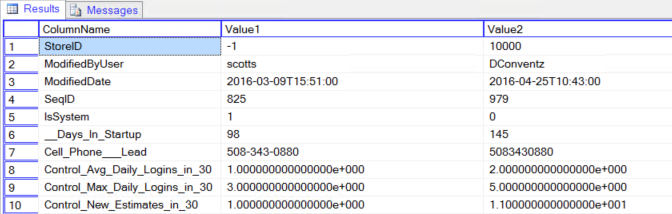
This SQL can be used to to find out all the differences between two database rows. These may be
- The same row in two tables
- Two rows in the same table.
This query is helpful to compare a backup with the current table, or to compare two rows in the same table.
=Risk of Data Corruption if Run Improperly=
None. This is a selection query and no data is modified in the running of it.
=Notes=
- All values are Varchar(100).
- Numbers are written in scientific notation, and to get them back to a numeric format you MUST cast them to a float first (and not a different numeric type).
For example:
Convert( Decimal(18,4), Convert( Float, Value1 ) ) is fine, but
Convert( Decimal(18,4), Value1 ) will only give you the mantissa and not the correct value.
* Only values that changed are listed. Values that remained the same are not shown.
- A NULL value can indicate the value was NULL or the record/field did not exist.
=SQL=
– this query compares rows in two tables and lists all the rows that are different.
– Set these values
declare @ID1 int = (select ID from Account where CompanyName like 'Grand Image Inc%' and IsClient = 1);
declare @Table1 varchar(100) = '[2016-03-09 AccountUserField]';
declare @ID2 int = @ID1;
declare @Table2 varchar(100) = '[AccountUserField]';
– Now run – the rest is good!
declare @xml1 xml;
declare @xml2 xml;
declare @t table (
ID INT IDENTITY(1,1) NOT NULL PRIMARY KEY,
ColumnName varchar(100),
Value1 varchar(100),
Value2 varchar(100)
);
declare @q nvarchar(2048) =
' set @xmloutput = (
select TOP 1 * from '+@Table1+' as [TABLE] where ID = '+convert(varchar(10), @ID1)+' Order by ID for XML AUTO, ELEMENTS
);'
EXECUTE sp_executeSql @q, N'@xmloutput XML OUTPUT', @xmloutput=@xml1 OUTPUT;
SET @q =
' set @xmloutput = (
select TOP 1 * from '+@Table2+' as [TABLE] where ID = '+convert(varchar(10), @ID2)+' Order by ID for XML AUTO, ELEMENTS
);'
EXECUTE sp_executeSql @q, N'@xmloutput XML OUTPUT', @xmloutput=@xml2 OUTPUT;
– now join the two XMLs using the ColumName and exclude any that are not different
with
XML1 as
(
select T.N.value('local-name(.)', 'nvarchar(100)') as NodeName,
T.N.value('.', 'nvarchar(100)') as Value
from @xml1.nodes('/TABLE/*') as T(N)
),
XML2 as
(
select T.N.value('local-name(.)', 'nvarchar(100)') as NodeName,
T.N.value('.', 'nvarchar(100)') as Value
from @xml2.nodes('/TABLE/*') as T(N)
)
insert into @t (ColumnName, Value1, Value2)
select coalesce(XML1.NodeName, XML2.NodeName) as NodeName,
XML1.Value as Value1,
XML2.Value as Value2
from XML1
full outer join XML2
on XML1.NodeName = XML2.NodeName
where coalesce(XML1.Value, '') coalesce(XML2.Value, '')
-- and XML1.NodeName not in ('StoreID', 'ModifiedByUser', 'ModifiedByComputer', 'SeqID')
;
– Now show the changes
select T.ColumnName, T.Value1, T.Value2
from @t T
=Version Information=
- Entered : 4/2016
- Version : SQL 2008 or Higher
=Related SQLs=
- Backlinks include_pagepage_componentbacklinks