Table of Contents
The initial load of Cyrious Control results in the pre-load of data from many different modules including reports, pricing forms, product and part data, inventory, etc. While pre-loading this information is useful for users that spend an extended period of time in an active session of Control it does increase the initial logon time considerably. If your usage pattern results in your logging in and out of Control regularly you may find that enabling QuickLaunch provides a more responsive experience.
Concept
QuickLaunch eliminates the pre-load of all non-essential modules and data. The upside to this is a more rapid logon process however it does have the downside of having to load the data needed for any modules the first time they are accessed. Users will notice an initial delay the first time they attempt to access any products during estimate or order entry, access any reports or security rights, etc.
Cautions
None
Enabling QuickLaunch for All Users on All Computers
- Browse to C:\Program Files (x86)\Cyrious\Control\
- Open the file Control_Options.txt with notepad. If one is not present you can create one by creating a completely blank text file in notepad.
- Add a new line to the file with the following option entered.
QuickLaunch=1

Enabling QuickLaunch for One Computer / One User
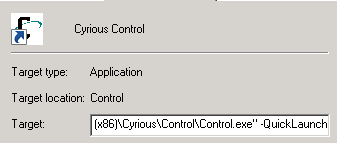
- Locate the shortcut labeled Cyrious Control on your desktop.
- Right-click on the shortcut and choose Properties.
- Add the following option to the very end of the Target for the shortcut.
-QuickLaunch
Source
Contributor: Brandon Readlinger, Cyrious
Date: 4/1/2014
Version: Control 4.5+
See Also
- Backlinks include_pagepage_componentbacklinks