Table of Contents
Description
Cyrious Estimates are numbered automatically by the system. However, the Estimate Number does not change with revisions. We have encountered instances where the client has selected the wrong estimate for the total price when crafting purchase orders or contracts and then pleaded confusion about which of the estimates submitted to choose from.
This page describes 2 approaches to creating a unique Estimate number when the Estimate is printed. The first uses the date and time and adds that to the Estimate number. This produces a long number - Ex: 112201_051020101630. The second uses the Sequence ID field of Cyrious which tracks every change to the estimate (including stages or non-numerical changes) which has the advantage of being a much shorter number - Ex: 112201_V4.
Concept
Approach number 1 uses the last modified date to indicate the “version” number of the Estimate. By concatenating or adding the Last Modified date in military time to the actual estimate number, we create a unique number to which we can refer when working with clients who have multiple estimates, even if created on the same day. To provide maximum flexbility to the User as to Estimate appearance and format, we use a Parameter to provide a choice whether to present the full number with the time or the “short version” of just the Estimate Number.
Approach number 2 also concatenates a number to the Estimate number but instead of the date uses the Sequence ID number which is a Cyrious internal tracking number showing the number of all changes to the Estimate (these may or may not be cost or formula based changes).
Cautions
None
Steps
- Using Crystal Reports open the Template which produces the Estimate. If this is the first time you have modified the Estimate in Crystal it may be a System Report. You create your own customizable version by Saving an Estimate using the Save As Crystal Report in the Options menu. Then retrieve the Report from the Report Export folder and, when your modifications are complete, saving it in the Reports folder. You then use the Reporting Setup feature to create a new Crystal Report.
- Approach 1: In the Preview mode select and right click the @Estimate Number field which is shown as it would appear in your Design View template of Crystal and then select Edit Formula.
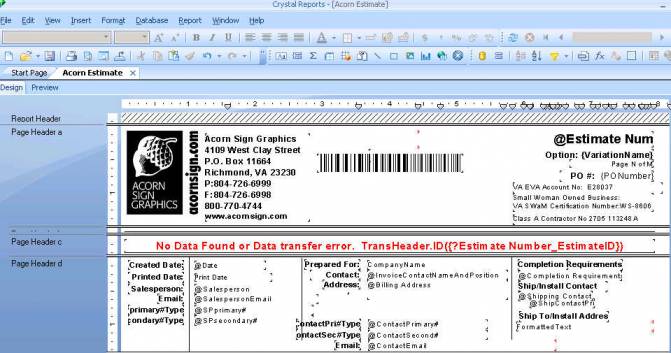
This will open an editing window which will look like the screen shot below (after you have pasted in the supplied code here, in this case the code for Approach 2).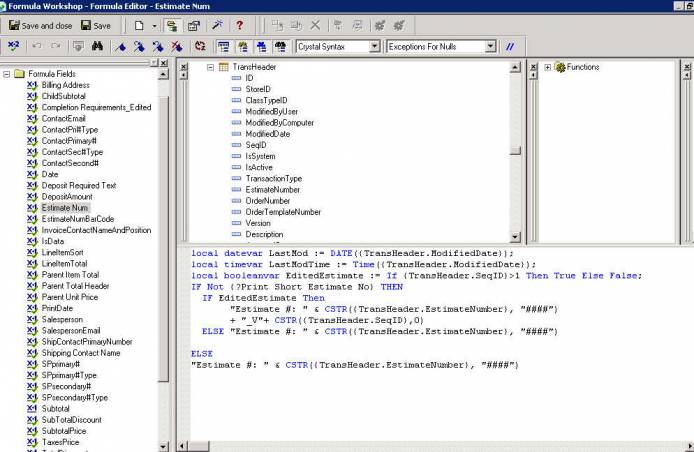
IF Not {?Print Short Estimate No} THEN
"Estimate #: " & CSTR({TransHeader.EstimateNumber}, "####")
+ "_"+ CSTR(CDATE({TransHeader.ModifiedDate}),"MMddyy")
+ CSTR(CTIME({TransHeader.ModifiedDate}),"HHmm")
ELSE
"Estimate #: " & CSTR({TransHeader.EstimateNumber}, "####")
- Approach 2: In the Preview mode select and right click the Estimate Number field and then select Edit Formula. This will open an editing window. Paste the following code into that window:
local datevar LastMod := DATE({TransHeader.ModifiedDate});
local timevar LastModTime := Time({TransHeader.ModifiedDate});
local booleanvar EditedEstimate := If {TransHeader.SeqID}>1 Then True Else False;
IF Not {?Print Short Estimate No} THEN
  IF EditedEstimate Then
       "Estimate #: " & CSTR({TransHeader.EstimateNumber}, "####")
       + "_V"+ CSTR({TransHeader.SeqID},0)
  ELSE "Estimate #: " & CSTR({TransHeader.EstimateNumber}, "####")
ELSE
"Estimate #: " & CSTR({TransHeader.EstimateNumber}, "####")
- Lengthen or widen the field in the Crystal Report to be sure it displays the full concatenated number.
- In the Field Explorer Window right click on the Parameters and select New. Name your Parameter “Print Short Estimate No”. Select Boolean as the parameter type. If you wish, delete the word “Enter” from the line which displays how the Parameter will be displayed in Cyrious.
- Save your Estimate Template to the Reports folder.
- Go to Reporting setup and create an Estimate Template in the Reports On Action Toolbar folder in the “for Estimates & Quotes” folder. Note that by selecting the Options Tab in the Report Setup you can pre-set the default options. We have made the long version the default so that it must be a conscious decision by the user not to use that format; but other users might want to make it the exception for only certain estimates – for example, only those where there are multiple versions. In that case check the box and save your Report Template.
- Save your revised template and go to any Estimate and Print/Preview your revised Template. In the options menu you will see a checkbox to Print the Short Version or the Long Version. Test that as well. Return to Crystal Reports to fix whatever isn't working. If all is printing as it should, you should see a presentation somewhat like the screen shot below for your Estimate number. You may note that we embed the Small Woman Owned Business number and the Class A Contactor number in the Header of our Estimates. (These are options which can be enabled or disabled with Parameters which appear as Options in the Cyrious Print Preview form. These are examples of the additional power available to the user with Crystal.)
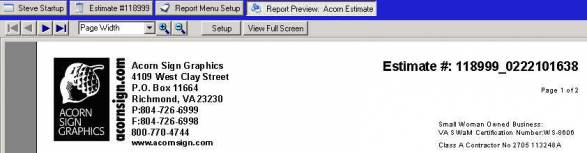
Approach 2 Result
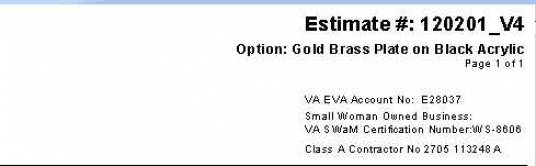
Source
Contributor: Steve Gillispie, Acorn Sign Graphics
Date: 05/22/2010
Version: Control 04.40.1003.3102