Reporting Setup
 | Main Menu | Setup | Reporting Setup |
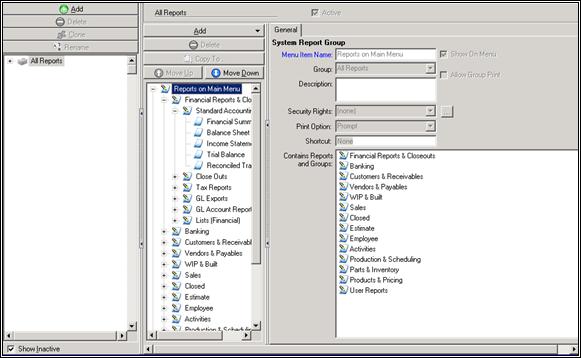
* Menu Item Name: Enter a name for the menu item.
* Show On Menu: Check this box if you want the item to be available from the menu.
* Group: Assign this menu item to a group.
* Allow Group Print: Check this box if you want all of these reports to be printed at once.
* Description: Enter a description for this menu item.
* Security Rights: Designate security rights for this menu item.
* Print Option: Select whether or not you want to be prompted before printing the reports selected.
* Shortcut: Enter a shortcut for printing this report, if desired.
* Show Inactive: When this option is selected, all options will be shown in the list. If this option is not selected, only active options will be shown.
Special Actions Toolbar Functions
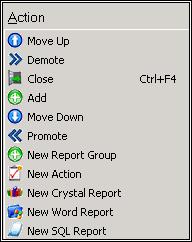
* Move Up: Moves the selected item in the list up.
* Demote: Demotes the selected item in the list.
* Close: Closes the reporting setup screen.
* Add: Add a new menu item.
* Move Down: Moves the selected item in the list down.
* Promote: Promotes the selected item in the list.
* New Report Group: Create a new report group.
* New Action: Create a new action.
* New Crystal Report: Create a new Crystal report.
* New Word Report: Create a new Word report.
* New SQL Report: Create a new SWL report.
General Tab
| | Main Menu | Setup | Reporting Setup | General Tab |
* Menu Item Name: Enter a name for the report. This is also the label that will appear should you choose to display this report on the Main Menu.
* Show On Menu: Check this box if you want the report to appear on the Main Menu under the Reports selection.
* Group: Select a group this report will be located in. These are pre-existing groups, e.g., Accounting Reports, Employee Reports, etc.
* Add a separator before this item in the menu: Check this box off if you want this item to be separated from the others it is listed with.
* Description: Your description of the report. Be as detailed as possible – what makes your Employee Commission Report different than your Employee Commission Rates Report?
* Security Rights: Designate who does and does not have access to view and print this report.
* Print Option: Choose whether or not you want prompts to appear before printing this report.
* Shortcut: If you want to, you can create a shortcut for this report. This shortcut will be stored on your Main Cyrious Toolbar.
* File location: Designate whether you want the report stored locally on your drive, or in the system.
Options Tab
| | Main Menu | Setup | Reporting Setup | Options Tab |
- Printer | Show Detail: Select this button to open more options for printing a report. These are typical printing options such as printer selection, number of copies, etc.
- Email | Show Detail: Select this button to open the email options for a report from Control. You can specify To, CC, and BCC addresses.
- Save | Show Detail: Select this option if you want to save a copy of the report to your server.
- Date | Show Detail: Use this button to select particular dates for the report.
- Division | Show Detail: Use this button to select the default division of your company you want to show on the report.
- Options: A variety of other criteria you can use to customize the report. These options will vary depending on the type of the report you are printing out and you should be familiar with these capabilities.