Table of Contents
Troubleshooting C3S Issues
Checking C3S for Potential Errors
- Start the SSLIP.
- Right click on the C3SHost system tray icon.
- Click RESTORE. If there are any system error messages they will display on this popup.
Errors Running the C3S Host Application
Unhandled exception has occurred in your application.
Could not find a base address that matches scheme http for the endpoint with binding MedataExchangeHttpBinding. Registered base address schemes are [].
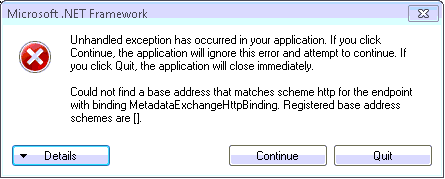
Cause
This error typically occurs when the database being used is disabled in the SSLIP.
Resolution
- Log into the SSLIP.
- Ensure that the database is enabled (either Control or SMS).
- Re-start the SSLIP.
The type initializer for 'System.ServiceModel.DiagnosticUtility' threw an exception.
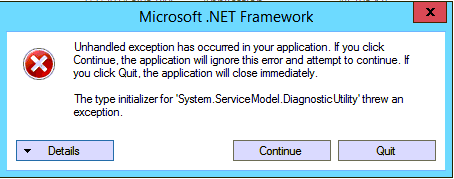
Resolution
- Open CMD prompt or powershell (Windows Server)
- Change the directory to %SystemRoot%\Microsoft.Net\Framework64\v3.0\Windows Communication Foundation\
- Type: ServiceModelReg.exe /I
- Press Enter.
- Close the SSLIP and C3S (if running) and re-launch the SSLIP.

A connection with the server could not be established -
http://localhost:8731/Cyrious/Utilities/C3S/Public/StoreData/- SOAPAction:http://tempuri.org/IC3SBRService/Test
Verify the C3S host application is running and the SSLIP.exe.config has the appropriate URL to the service.
Would you like to try connecting again?
Cause
- The C3S application has not been installed or is not running on the server.
- Localhost is not accessible from the local computer.
Resolution
- Copy the installation file (C3SInstaller.msi) to the SSLIP folder and restart the SSLIP. The SSLIP will automatically run the install file.
- Check the hosts file located in C:\Windows\System32\Drivers\Etc to ensure that there aren't any incorrect entries that are re-routing localhost to another IP, such as 0.0.0.0.
__**Error:**__
“Connection string for Store Data could not be found. Verify the C3S configuration file is setup correctly.”
Cause
The C3S install is corrupted or using incorrect files.
Resolution
Check file versions to make sure they're the correct ones. Replace with a new install.
**Error:**
HTTP could not register URL http://+:8731/Cyrious/Utilities/C3S/Public/.
Your process does not have access rights to this namespace
Cause:
On Windows Vista and later versions, HTTP web services listening at a particular HTTP address on user accounts other than the system administrator are restricted to run with Administrator privileges by default.
Resolution #1:
Login as the system administrator for that machine and run the SSLIP.
Resolution #2:
The URL must be reserved for the user running the SSLIP using the netsh http command:
- Start the command prompt using “Run as administrator”. (Start » All Programs » Accessories » Command Prompt)
- Type the following: netsh http add urlacl url=http://+:8731/Cyrious/Utilities/C3S/Public/ user=Everyone.
- Restart the SSLIP and C3S.
**Error:**
Login failed for user ''. Verify the C3SConnectionString property is
pointing to the right database in the C3S config file
'C:\Program Files\Cyrious\SSLIP\Utilities\C3S\C3SHost.exe.config'
Cause:
By default, the C3S host is configured to connect to the SQL database using “Integrated Security=True” in the connection string. For most Control setups, the SSLIP is run on the same machine as the SQL Server and the logged in user has access to the database. However, in cases where SQL Server is located on a dfferent machine and the logged in user does not access privileges to SQL, C3S will fail to login.
Resolution #1: Modify rights for BUILTIN\Users
- Log into Microsoft SQL Management Studio
- Go to the security section for SQL Server
- Double click on the BUILTIN\Users account
- Modify the permissions to include dbadmin, sysadmin.
- Restart the SSLIP and log into Control.
Resolution #2: Add User to SQL Server login
- Modify SQL Server to allow the user the SSLIP will run from as an accepted login user.
Resolution #3: Modify the C3S Connection String
- Open the SSLIP_Options.txt
- Add this option to the file and save: UpdateC3SHostConfig=0. This will prevent the SSLIP from overriding the changes that will be made next in the C3S Host configuration file.
- Open the C3SHost.exe.config file located in …\SSLIP\Utilities\C3S\.
- Remove the Integrated Security=True parameter from the connection string.
- Type this new parameter in its place User Id=USERNAME; Password=PASSWORD;
*Note: Replace USERNAME and PASSWORD with the appropriate user name and password to access the SQL Server database.
Resolution #4: Switch Users
- Run the SSLIP as a user that has rights to the SQL Server database.
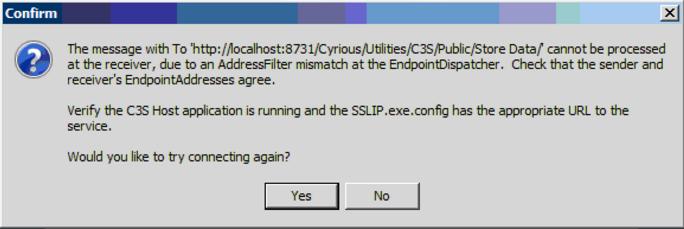
Cause:
The C3SHost.exe.config file was not updated by the SSLIP.
Resolution
- Run the SSLIP on administrator's login or Right-click the exe and Run as administrator.
- Check the date and time stamp on the C3SHost.exe.config file to verify it was updated after the sslip runs.
During C3S Installation
**Error:**
Error 1001. Exception occurred while initializing the installation:
System.IO.FileNotFoundException: Could not load file or assembly
'file:///C:\SERVERNAME\cyrious$\SSLIP\Utilties\C3S\C3S Host.exe'
or one of its dependencies. The system cannot find the file specified..
Cause:
Running the SSLIP with the C3S installer MSI in the path from a UNC such as “\\CyriousServer\Cyrious$\”. The SSLIP passes the file path it is running from to the C3S installer as a parameter but the installer expects a local path to install to.
Resolution:
Go to the actual local path where the SSLIP is located (“C:\Program Files\Cyrious\SSLIP\”) and run it.
When Storing Credit Card Information or Posting Payments
The operation timed out ...
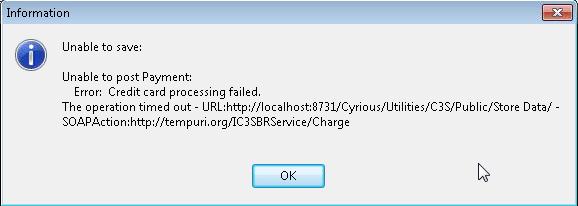
Unable to save:
Unable to post Payment:
Error: Credit card processing failed.
The operation timed out - URL:http://localhost:8731/Cyrious/Utilities/C3S/Public/Store Data/ -
SOAPAction:http://tempuri.org/IC3SBRService/Charge
The connection with the server was reset ...
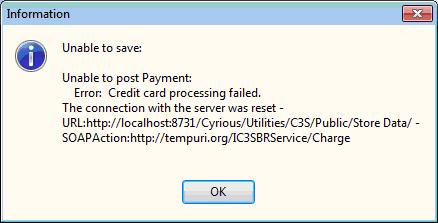
Unable to save:
Unable to post Payment:
Error: Credit card processing failed.
The connection with the server was reset -
URL:http://localhost:8731/Cyrious/Utilities/C3S/Public/Store Data/ -

Unable to save:
Unable to post Payment:
Error: Credit card processing failed. The operation timed out -
URL:http://localhost:8731/Cyrious/Utilities/C3S/Public/Store Data/ -
SOAPAction:http://tempuri.org/IC3SBRService/StoreNewCustomerInformation
Cause:
The communication between the SSLIP and C3S is being blocked.
Resolution #1 - AVG Anti-Virus:
If AVG is installed:
1. Open AVG's User interface.
2. Disable “LinkScanner” and “Online Shield” components. Ensure that the status within the AVG window shows “Disabled”.
4. Click 'Save changes'
Note: Other brands of Anti-Virus applications can also cause this problem to occur. If the anti-virus appears to have any type of link scanner component be
sure to verify through testing that this component is not leading to your problem.
Known Anti-Virus Software that causes issue:
- AVG www.avg.com - Disable Link Scanner and Online Shield components.
- Kaseya www.kaseya.com - Unable to add exclusions, user must contact Kaseya technical support or uninstall Kaseya.
Retry posting the payment.
Resolution #2:
During these steps we'll force the SSLIP to recreate the necessary connection strings for C3S.
- Shutdown the SSLIP.
- Naviagate to the C:\Program Files\Cyrious\SSLIP\ folder.
- Open the file SSLIP_Options.txt.
- If the option UpdateC3SHostConfig=0 option exists delete that option from the file and save your changes.
- Restart the SSLIP. During the restart of the SSLIP the connection strings are recreated each time based on the configuration within the SSLIP.