Table of Contents
Introduction
Zip Code lookup is a new feature in Control that is used to automatically look up the City, State, and other location information based on the zip code entered. This feature will help save users plenty of time when entering in a company or contacts address.
Address Frame
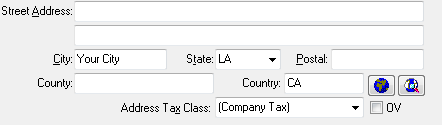
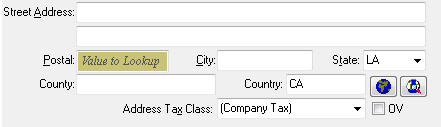
All changes are limited to the address frame. The address frame will have two flavors - standard (as currently implemented) and with lookup (see below). These are the same frame in code with different options enabled.
Standard:
With Lookup:
The Address With Lookup frame is enabled in the following cases:
- The option in System Setup is enabled
- The business' country is one of the supported country codes.
The frame includes the following changes to the standard frame:
- The postal code field is moved before the City / State (on screen and within the tab order).
- If the City field is blank:
- The Postal input box is filled with a slight color to signify something is different.
- “Value to Lookup” is displayed as the watermark text for the postal code input box.
The postal code is automatically looked up when you exit the postal code input field under the following conditions:
- The postal code text contains 4 or more characters
- The country is set to one of the supported country codes. A blank country is treated as “US”.
Upon successful lookup, the City, State, and Country will be replaced with the returned values. The City ,State, and Country are overwritten with the returned values if they are different.
If the lookup is attempted and fails, the message returned will be displayed in the lower right corner of Control as a message, such as:
The {country} postal code lookup for {postalcode} failed.
The message returned was 4xx - Resource not found.
Note: The CHAPI service and CHAPI based SSLIP software is required for this feature.
Address Option Screen
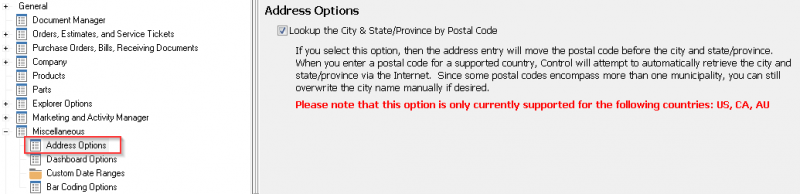
The option to enable Zip code lookup is found under System Setup | Miscellaneous | Address Options.
Supported Country Codes
The following country codes are currently supported:
- US - United States
- CA - Canada
- AU - Australia