Overview
The combination of Cyrious’ inventory tracking and CFL’s capabilities are a power combination. Prior to 2010, Cyrious users could only track inventory at the division level. Cyrious introduced warehouses in 2010 to enable businesses to split their inventory into multiple independent warehouses within a division.
As Cyrious’ customers have become leaner in their business practices, it has become desirable to enhance the inventory system within a single location to separate out inventory that is released to production from inventory that is still in the stockroom. For this purpose, Cyrious is introducing its Production Floor Inventory Tracking System (ProFITS).
ProFITS is a new, licensed module in Control that adds Warehouse Groups, Stockroom Warehouses, and Kanban Warehouses to the standard warehouse type already available in Control.
Warehouse Types
The Production warehouse inventory system classifies all warehouses into one of four types:
- Standard Warehouse – Standard warehouses can be used for material storing as well as direct production. As such, they combine the capabilities of Kanban and Stockrooms. Standard warehouses have existed in Control since version 4.0.
- Kanban Warehouse – A Kanban warehouse designates a warehouse that is used for production but does not normally hold a significant amount of inventory. Material is normally transferred into a Kanban warehouse on demand for specific orders or using a replenishment system. Kanban warehouses are most effective when tied with a Stockroom warehouse.
- Stockrooms – Stockrooms designate warehouses that stock significant levels of materials but whose materials are not used for direct production. Hence, orders may reserve materials against a Kanban warehouse and the reserved quantity is always zero. Stockrooms have the advantage of being very easy to inventory and control since there is never a question of what material is “on the machine” or in the process of being consumed. Use of a stockroom requires at least one non-stockroom warehouse exist in the inventory group.
- Warehouse Group – A warehouse group is made up of combinations of other warehouses. Warehouse groups roll up and give a combined total inventory number. Warehouse Groups are primarily used for estimating and determining overall materials availability.
In Control version 4.6 and early, all warehouses were standard warehouses. Standard warehouses can be used for both production and inventory control. Though useful, the multi-purpose nature of standard warehouses did not provide all of the controls desired in some high-throughput and lean environments.
A premise of most lean material management systems is the release/arrival of materials on the production floor only when that material is required. When JIT delivery of all materials is not feasible, inventory is maintained in a separate stockroom that is not integrated into the production floor environment. Control uses two specialized warehouses to represent these inventory stores, Kanban Warehouses and Stockrooms.
Kanban warehouses hold limited amounts of material, normally just enough for existing orders and to pre-load machines. The goal of a lean environment is to reduce the Kanban inventory to (nearly) zero. In this environment, needed material is only transferred into Kanban inventory based on actual orders. Similarly, excess material in a Kanban warehouse is often returned to the stockroom upon job completion. Control provides a Material Transfer Screen to facilitate these inventory transfers.
Stockrooms are warehouses designated for inventory control and may not be used directly for production. The intent of a stockroom is to supply other Kanban and standard warehouses. As such, orders may not select the stockroom as its production warehouse.
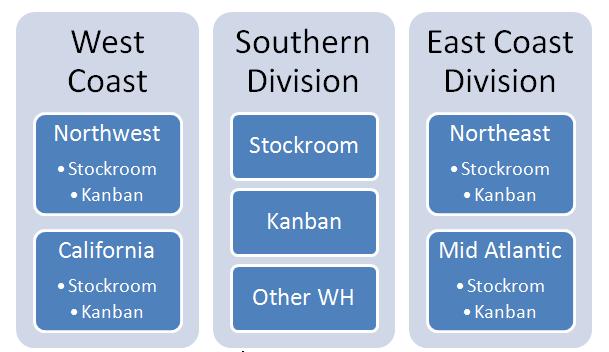
All warehouses existing within the context of a Warehouse Group. A warehouse groups contain other warehouses and provides the overall picture of inventory for the warehouses contained. The top level of each division is automatically a warehouse group.
Warehouse Groups
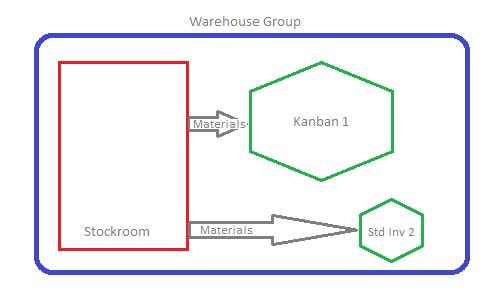
Warehouse Groups provide a way to organize and summarize inventory levels for multiple warehouses. Warehouse Groups work in the following way.
- The inventory level of a Warehouse Group is always equal to the total inventory levels for all sub-warehouses.
- A warehouse group contains the following (sub) warehouses:
- Zero or one default production warehouse, which may be a Kanban or standard warehouse.
- Zero or more stockroom warehouses.
- Zero or more other production warehouses, which may be Kanban or standard warehouses.
- Zero or more Warehouse Groups.
- Each division is automatically a warehouse group.
Using this logic, it is possible to build “levels” of inventory where divisions correspond to the top-most warehouse group but can contain nested groups within it.