{$page}
Very often you will need to design a certain amount of user-specified flexibility into your SQL Reports, similar to that which is done through options in with Crystal Reports. Control's SQL Reports allow you to build options that dynamically build a dialog for the user when running the report. This functionality is similar to, though not identical to, the options in Crystal Reports.
INCOMPLETE
Option Syntax
Discrete Options
Collection Options
Notes:
- SETs return their values as a comma delimited list of IDs
- To See the List of Values Returned, use (something like) SELECT
    * In a IN group, as in WHERE Employee.ID IN ()


» The Parentheses ( ) are critical when using a SET with Where IN clause
    * By coverting to a table of IDs, as in SELECT * FROM dbo.CrystalListToIntTable(
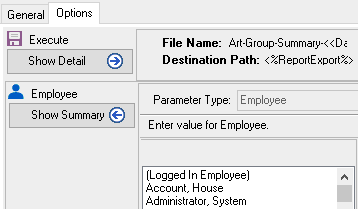
); - The value for the Set is selected on the Options Tab For the SQL Report you are creating. For Example: you can set this to the Employee list in Control. You can also select from a set of standard variables data types such as Date, Date & Time, Order Number, Employees Lists and Products Lists that will be selectable at runtime.
Range Options
Setting the Option Type in Control
Examples
Exporting An Employees Calendar to Outlook
control.cyriouswiki.comcode_formatsql
Declare @CalendarID int;
Declare @MinDate datetime; – Set the absolute earliest date you want to query
Declare @MaxDate datetime; – Set the absolue latest date you want to query
Set @CalendarID = ;
Set @MinDate = ISNULL(CONVERT(DateTime, ),'1/1/1900');
Set @MaxDate = ISNULL(CONVERT(DateTime, ),'1/1/2100');
Declare @ZeroDate date;
Declare @Delimiter varchar(7);
Declare @AddressDelimiter varchar(7);
Set @ZeroDate = '12/30/1900';
Set @Delimiter = ' '+CHAR(13)+CHAR(10);
Set @AddressDelimiter = ', ';
select
J.ID as [KeyID],
convert( VarChar(10), coalesce(J.StartDateTime, J.QueryStartDateTime), 101) as [Start Date],
convert( VarChar(12), convert(time, case when (CA.AllDayEvent=1 or CA.IsTimeless=1) then '00:00' else coalesce(J.StartDateTime, J.QueryStartDateTime) end), 0 ) as [Start Time],
J.Description as [Subject],
RTrim(Address.StreetAddress1 + coalesce(' ' + Address.StreetAddress2, ))
+ @AddressDelimiter + coalesce(Address.City + ', ', ) + coalesce(Address.State + ' ', ) + coalesce(Address.PostalCode, )
+ ' (' + Account.CompanyName + ')'
as [Location],
Account.CompanyName
+ ' (' + AC.FirstName + ' ' + AC.LastName
+ coalesce(' ' + Phone.FormattedText, '') + ') '
as [Meeting Organizer],
'Company: '+ Account.CompanyName
+ @Delimiter + 'Contact: ' + (AC.FirstName + ' ' + AC.LastName)
+ @Delimiter + 'Phone: ' + Phone.FormattedText
+ @Delimiter + 'Employee: ' + Employee.LastName +', '+Employee.FirstName
+ @Delimiter + 'Notes: ' + Cast(J.Notes as VarChar(1024))
as [Description],
convert( VarChar(10), coalesce(J.EndDateTime, J.QueryEndDateTime), 101) as [End Date],
convert( VarChar(12), convert(time, case when (CA.AllDayEvent=1 or CA.IsTimeless=1) then '23:59:59.9' else coalesce(J.EndDateTime, J.QueryEndDateTime) end), 0 ) as [End Time],
case when (CA.AllDayEvent=1 or CA.IsTimeless=1) then 'TRUE' else 'FALSE' end as [All Day Event],
case when J.ReminderPrompt = 1 then 'TRUE' else 'FALSE' end as [Reminder On/Off],
case when J.ReminderPrompt=0 then NULL else cast(J.ReminderDateTime as Date) end as [Reminder Date],
case when J.ReminderPrompt=0 then NULL else cast(J.ReminderDateTime as Time) end as [Reminder Time],
case when CA.PrivateEvent = 1 then 'TRUE' else 'FALSE' end as [Private],
CA.PriorityText as [Priority],
Employee.LastName +', '+Employee.FirstName as [Employee Name],
Account.CompanyName as [Company Name],
(AC.FirstName + ' ' + AC.LastName) as [Contact Name],
Phone.FormattedText as [Phone Number],
J.Notes as [Notes Only],
@CalendarID as CalendarID,
J.ModifiedDate as [Last Modified],
J.AccountID as AccountID,
J.TransactionID as TransHeaderID,
J.ID as JournalID
from
Journal J
join ContactActivity CA on J.ID = CA.ID
join CalendarLink CL on J.ID = CL.JournalID
left join TransHeader TH on J.TransactionID = TH.ID
left join Account on J.AccountID = Account.ID
left join AccountContact AC on J.ContactID = AC.ID
left join Employee on CL.CalendarID = Employee.ID
left join Address on coalesce(AC.ShippingAddressID, Account.BillingAddressID) = Address.ID
left join PhoneNumber Phone on coalesce(AC.MainPhoneNumberID, Account.MainPhoneNumberID) = Phone.ID
where
EmployeeID = @CalendarID
and J.QueryStartDateTime between @MinDate and @MaxDate
and J.CompletedDateTime IS NULL
– There is no field to save whether this record was exported or not.
– In order to put this some place, we are going to use two depricated integer fields in the CalendarLink table.
– The CalendarStoreID will store the days from the “Zero Date” since the activity was last modified.
– The JournalStoreID will store the minutes from midnight since the activity was last modified.
– After the export we will need to run a query to set these values!
and ( (J.ModifiedDate - coalesce(CL.CalendarStoreID, 0) > @ZeroDate)
or (DatePart(Hour, J.ModifiedDate) * 24 + DatePart(Minute, J.ModifiedDate) > coalesce(CL.JournalStoreID, 0)) )
code
===== See Also =====
* Backlinks include_pagepage_componentbacklinks
* Setting Up A SQL Report