{$page}
Concept
This report allows you to view failed API requests.
Considerations
- This report will not work until the APIRequestErrors table has been created. It will be automatically created when the first error is generated.
- This requires WAPIC 1.8 (11/4/2014) or newer.
Steps
- Open Reporting Setup (Setup → Reporting Setup)
- Select the Category you want this report to appear in (I used Reports on Main Menu)
- Click Add → New SQL Report
- Enter the following values:
| Field Name | Value | ||
| Menu Item Name | API Errors | ||
| SQL | see below | ||
| Options | Create View And Save |
The SQL field should contain the following query:
SELECT
DTReceived,
RequestingIP,
Verb,
RequestURL,
RequestBody,
ErrorCode,
ResponseBody
FROM
APIRequestErrors
WHERE
DTReceived
Your Report Setup should look something like this:
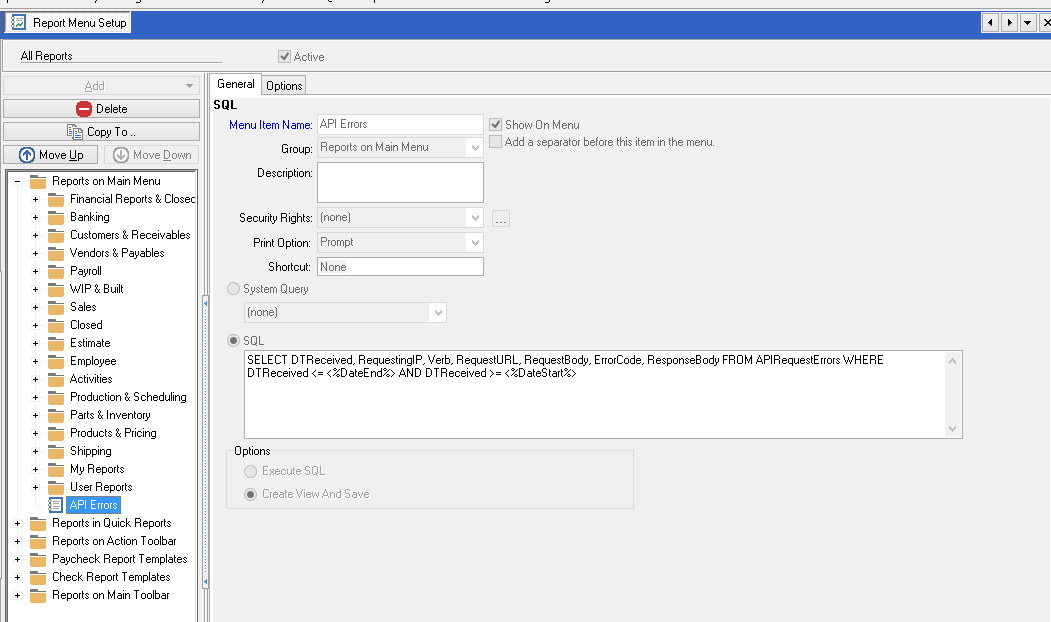
- Now switch to the options tab and you can enter a default date range
For example, I have effectively set my default date range to All:
From: 1/1/1900
To: 1/1/2099
You may specify down to the hour and minute with date formats such as 11/4/2014 10:38
You may also specify the default export type. I am using HTML for the example below:
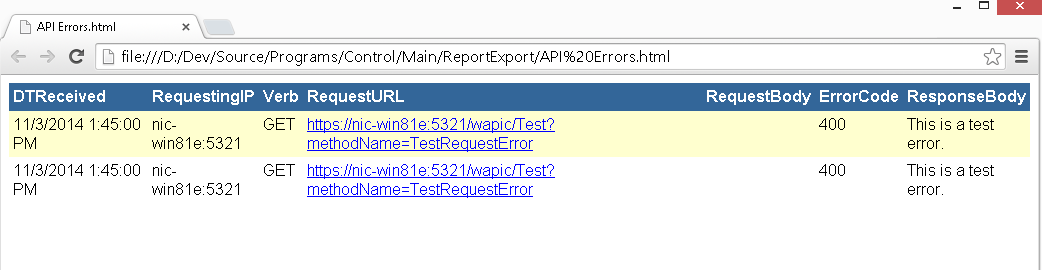
* This is a sample of the output of the report with a test error:
See Also
- Backlinks include_pagepage_componentbacklinks
You could leave a comment if you were logged in.